Sommario
What is a “MAV” form
The MAV forms is a pre-filled payment notice, identified by a unique 17-digit code, commonly used in Italy for university fees or real estate property expenses. It functions as a “smart invoice” that allows the recipient to automatically recognize who has paid, eliminating the need to manually send receipts.
For someone abroad, with an Italian account, it is the simplest and most convenient method of payment, because it can be paid easily via online banking.
The payer just needs to enter the numerical code in the e-banking form, as well as the amount and desired payment date – and the transaction is usually immediate and free of any bank commissions.
How to make the payments
To make a MAV payment using your Italian bank account, you essentially need to follow a few digital steps through your banking portal.
Since the MAV form is a standard system, integrated within the Italian banking circuit, your Italian bank already has a dedicated “template” for it, so you won’t need to manually enter the recipient’s IBAN or address.
Step 1: Locate the 17-Digit Code
Open your MAV document (the PDF, or paper slip).
Look for a long numerical string labelled “Codice Identificativo MAV” or “Codice MAV” (a 17 digit number).
You will also need the exact amount (Importo) and the deadline (Scadenza), usually in the same area.
Step 2: Log In to Your Italian Bank
Access your bank’s official website or mobile app.
Since you are abroad, ensure you have your physical token or smartphone ready to receive the OTP (One-Time Password) or biometric authorization (FaceID/Fingerprint) required for login.
Step 3: Find the “MAV” Section
Navigate through the menu.
Look for these Italian keywords:
- “Pagamenti” (Payments)
- “Bollettini” (Bulletins)
- “MAV / RAV” (This is usually a specific sub-menu)
Step 4: Enter the Data
- Select the MAV option. The system will present you with a form:
- Insert the 17-digit code: Type it carefully without spaces.
- Verify the details: In some cases, once you enter the code, the bank will automatically “pull” the amount and the recipient’s name from the national database.
- Manual Entry: If the data doesn’t appear automatically, manually type in the Amount (Importo), the date of payment (Data) and the Reason for payment (Causale) as shown on the payment slip.
Step 5: Authorize and Confirm
Review the summary page to ensure all numbers are correct. Click “Confirm” or “Paga“. Your bank may ask for a final security authorization (SMS code, app notification, or token).
Step 6: Save the Receipt
Once the transaction is successful, do not just close the app. Look for a button that says “Scarica Ricevuta” (Download Receipt) or “Versione PDF“. Save this file; it is your official legal proof that the payment was made.
Check the time
Italian banks often process MAVs during specific business hours (usually between 06:00 and 23:00 CET). If you are in a very different time zone and the system gives you an error, try again during Italian daylight hours.
Reading a MAV bulletin
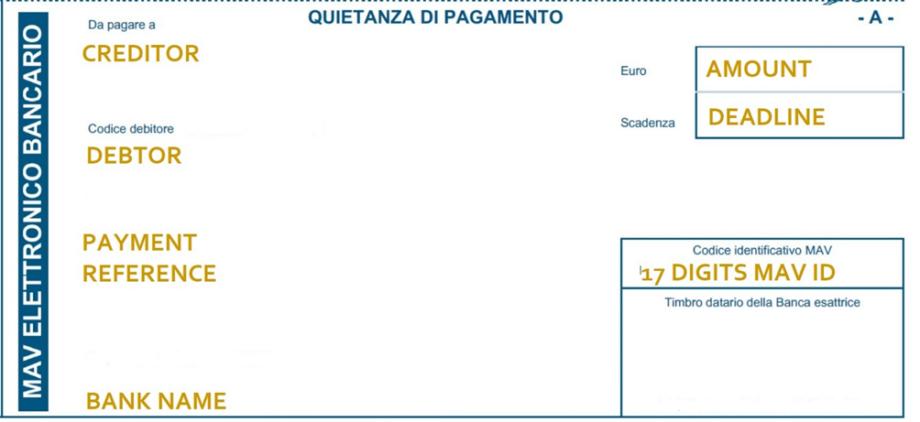
Reading an Italian MAV bulletin for the first time can be tricky because it is packed with technical terms. To read it correctly, you only need to focus on a few specific areas of the document, usually located in the header or the central box.
The most important part of the document is the Codice Identificativo (Identification Code), which is a unique string of 17 digits. This is the “DNA” of your payment; when you type this into your banking app, the system automatically knows who you are and what you are paying for. You will also see the Importo (Amount), which is the exact figure you need to pay, usually including two decimal places, and the Scadenza (Deadline), which is the final date to complete the payment without incurring late fees.
The bulletin will clearly list the Creditore (Creditor), which is the institution or company you owe money to, such as your University or a Public Administration. Opposite to that, you will find the Debitore (Debtor), which should be your name and fiscal address. It is always wise to double-check that your Codice Fiscale (Tax Code) is printed correctly in this section to ensure the payment is attributed to the right person.
Pro Tip
Many modern MAV bulletins also include a QR Code. If your Italian banking app has a “Scan & Pay” feature, you can simply point your camera at this code; it will automatically fill in all the 17 digits and the amount for you, saving you from manual typing errors.
MAV sample / template